CAD and BIM administrators
Understand feature demand, denials, users, workstations, and license usage patterns across design teams.
Turn raw license manager logs into clear browser-based reports for usage, denials, peak concurrent demand, users, workstations, features, vendors, session duration, and data quality.
Private browser-based analysis. No server upload. No backend processing. Your log stays on your device.
Create your workspace or sign in to start analyzing license manager logs, review usage reports, export CSV files, and prepare license optimization insights for your engineering software environment.
Raw license manager logs are hard to read manually, especially when engineering software is shared across teams, users, workstations, departments, and global sites. License Log Analysis turns those records into practical license usage reports for floating license usage, license denials, peak concurrent usage, session duration, features, vendors, raw events, and parsing quality.
Upload FlexNet, RLM, Sentinel RMS, DSLS, Altair ALM, or X-Formation LM-X license activity.
Normalize users, workstations, vendors, features, dates, sessions, and denials.
Review grouped reports, sort table rows, filter results, and export CSV files.
Analyze license activity across the license managers commonly used for CAD, BIM, PLM, simulation, EDA, rendering, and other engineering software environments.
Analyze FlexNet Publisher and FlexLM debug logs to understand checkouts, check-ins, denials, users, workstations, features, vendors, and peak concurrent usage across engineering applications.
Parse Reprise RLM report logs to track license sessions, usage duration, denials, feature demand, and concurrent activity across RLM environments.
Review Sentinel RMS usage logs to understand floating license activity, user demand, feature consumption, session duration, and availability trends.
Analyze DSLS license activity for Dassault Systemes environments and understand usage patterns, denials, and demand across engineering teams.
Analyze Altair ALM license activity to review usage, denials, concurrent demand, users, workstations, and feature-level availability across engineering software environments.
Analyze X-Formation LM-X debug logs to investigate license events, concurrent usage, session duration, users, workstations, and feature-level demand.
Move from raw log lines to practical software license optimization insights, with grouping, sorting, filtering, and CSV exports where applicable.
Summarize sessions, denials, users, features, vendors, date ranges, and overall engineering license usage.
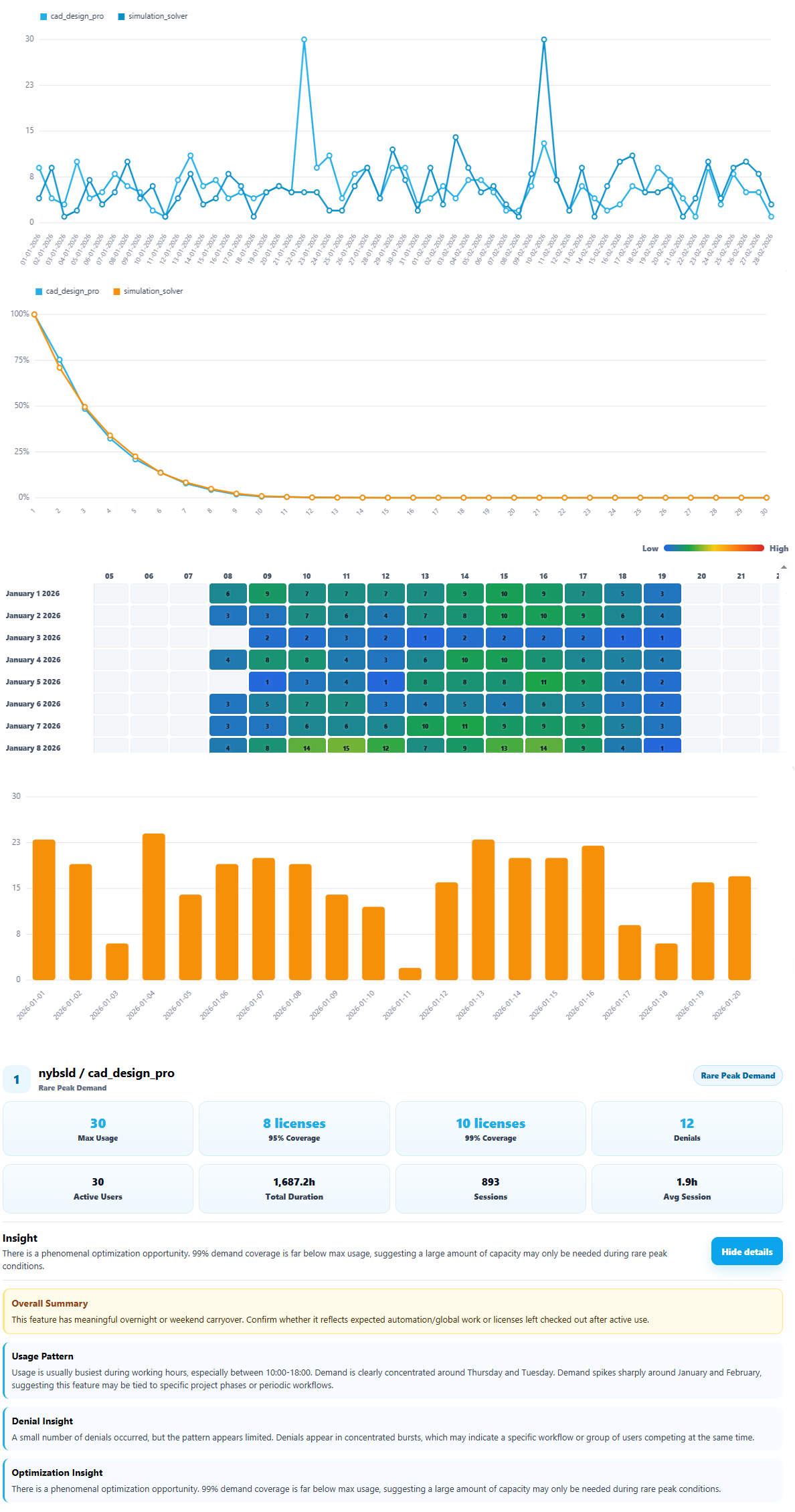
Find peak concurrent license usage by feature, user, workstation, vendor, and time period.
Understand who was denied, which feature was requested, and when demand exceeded availability.
Measure how long licenses were held and spot long sessions or unusual license behavior.
See how many unique users are active so teams can understand adoption and license demand.
See how active usage time is distributed across concurrent license levels.
Review parsed license log events in a detailed table and inspect the original event details.
Visualize license activity patterns over time to quickly identify busy periods and recurring demand patterns.
See a summarized profile for each feature, including demand coverage and optimization insights.
The free analyzer processes logs locally in the browser. There is no server upload and no backend processing, which makes it useful for quick local analysis of sensitive engineering license data. CSV exports stay under your control.
Designed for the teams responsible for license availability, CAD license usage, BIM license usage, engineering software license monitoring, renewals, and software license optimization.
Understand feature demand, denials, users, workstations, and license usage patterns across design teams.
Review license server log analysis without waiting for a full monitoring rollout.
Support renewals, right-sizing, availability reviews, and vendor discussions with usage evidence.
Investigate denials, long sessions, unknown records, and feature-level demand.
See how floating licenses are being consumed by users, workstations, and teams.
Create focused license usage reports for discovery, assessment, and advisory work.
Answers for teams evaluating a license log analyzer for engineering software license monitoring and optimization.
License Log Analysis turns raw license manager logs into readable reports for usage, denials, concurrent demand, users, workstations, features, vendors, session duration, and data quality.
The tool analyzes engineering license manager logs including Flexera FlexNet / FlexLM, Reprise RLM, Sentinel RMS, Dassault Systemes DSLS, Altair ALM, and X-Formation LM-X.
No. FlexNet and FlexLM logs are an important use case, but the product is a broader license manager log analyzer for multiple engineering license manager formats, including RLM, Sentinel RMS, DSLS, Altair ALM, and X-Formation LM-X.
No. The browser-based analyzer processes the file locally on the user's device. There is no server upload and no backend processing for the free analyzer.
The analyzer can generate overview metrics, concurrent usage reports, denial reports, usage duration reports, raw event tables, and data quality reports. Reports may include filtering, grouping, sorting, and CSV export.
License manager logs can show real floating license usage, peak demand, denied requests, long sessions, and optimization opportunities. This helps with renewals, procurement, license availability, and software asset management.
Yes. Many engineering applications use license managers such as FlexNet, RLM, Sentinel RMS, DSLS, Altair ALM, and X-Formation LM-X. Log analysis helps teams understand actual engineering software license usage.
Open the browser analyzer, load a supported license log, and start reviewing usage, denials, concurrency, and session duration.
Need help with license log analysis or an OEM/API integration? Book a call.
License Log Analysis helps administrators, engineering IT, SAM teams, and consultants turn raw license activity into the usage evidence needed for better availability, renewals, and optimization decisions.